 Smart Home Forge
Matter vs Zigbee vs Z-Wave vs Wi-Fi vs Thread: Smart Home Protocols Compared
A detailed comparison of Zigbee, Z-Wave, Wi-Fi, and Thread — covering range, battery life, hub needs, and ecosystem fit to help you pick the right protocol.
If you have read our beginner’s guide to smart home protocols, you know the basics: what each protocol does, whether you need a hub, and how Matter fits in. This article goes deeper. It is the reference you come back to when you are deciding which protocol to actually buy into — and what the real trade-offs look like in daily use.
First: Matter Is Not a Protocol
 This is the most common point of confusion, so let us address it upfront.
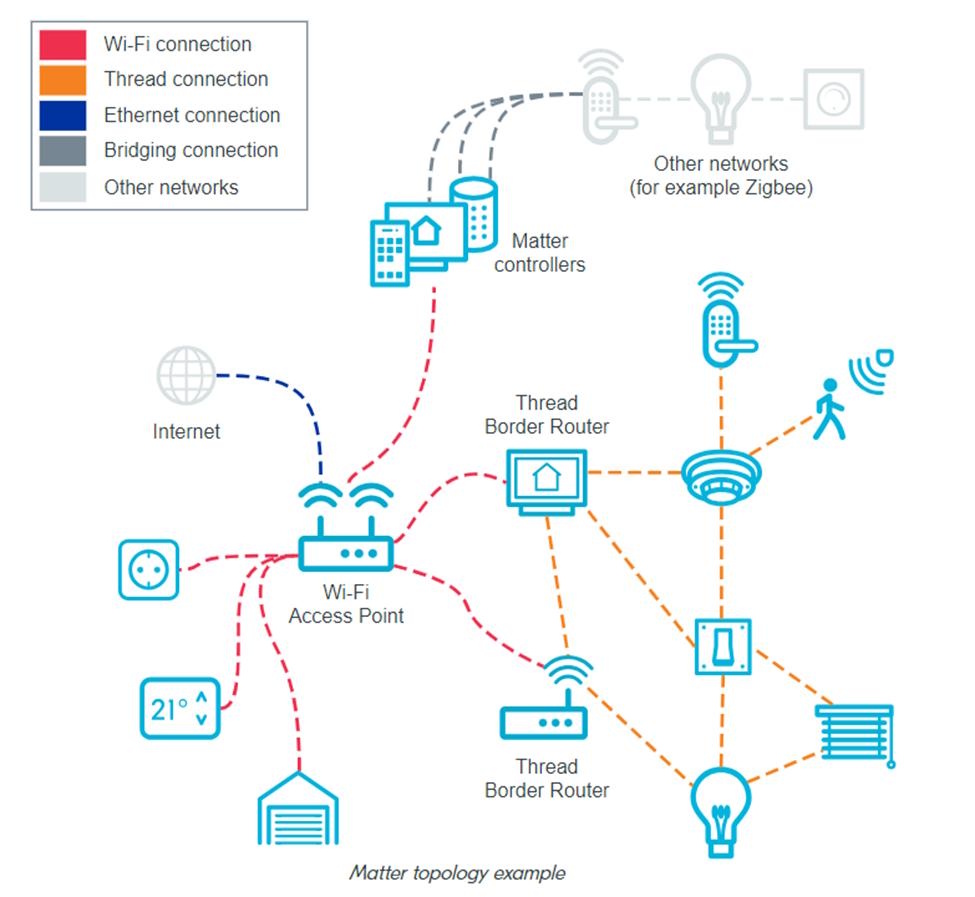
Zigbee, Z-Wave, Wi-Fi, and Thread are wireless communication protocols. They define how devices physically send and receive radio signals. Matter is something different — it is an application-layer standard that runs on top of Wi-Fi, Thread, and Ethernet. Matter defines how devices identify themselves, how they pair with ecosystems, and how they communicate at the software level.
Why does this matter practically? Because when you see “Matter over Thread” or “Matter over Wi-Fi” on a product box, the underlying protocol still determines range, power consumption, mesh capability, and hub requirements. Matter gives you cross-ecosystem compatibility. The transport protocol underneath determines the physical performance.
This article compares the four transport protocols: Wi-Fi, Zigbee, Z-Wave, and Thread. We will note where Matter compatibility applies, but the core comparison is about the underlying wireless tech.
Protocol Comparison Table
| Wi-Fi | Zigbee | Z-Wave | Thread | |
|---|---|---|---|---|
| Frequency | 2.4 GHz / 5 GHz | 2.4 GHz | 800–900 MHz (varies by region) | 2.4 GHz |
| Mesh networking | No | Yes | Yes | Yes |
| Max devices (practical) | 20–40 per router | 200+ per hub | 232 per network | 250+ per network |
| Hub required | No (uses router) | Yes | Yes | Border router |
| Battery life | Poor | Excellent | Excellent | Excellent |
| Range per device | 30–50m indoors | 10–20m indoors | 30–100m indoors | 10–20m indoors |
| Wall penetration | Moderate | Moderate | Strong | Moderate |
| Matter support | Yes (transport) | No (bridge only) | No (bridge only) | Yes (transport) |
| Interference risk | Moderate–High | Moderate | Low | Moderate |
| Device selection | Very large | Large | Medium | Growing |
| Avg. device cost | Low–Medium | Medium | Medium–High | Medium |
| Setup complexity | Easy | Moderate | Moderate | Easy–Moderate |
The numbers above are generalizations. Real-world performance depends on your home’s construction, interference environment, and specific devices. But the relative differences are consistent.
Wi-Fi: The Default Choice (and Its Limits)
What it is: The same wireless network your phone and laptop use. Wi-Fi smart devices connect directly to your router without any additional hub.
Strengths
- No hub required. Plug it in, connect to your app, done. This is why Wi-Fi dominates entry-level smart home products.
- Broad ecosystem support. Every smart home platform works with Wi-Fi devices.
- High bandwidth. Ideal for devices that stream data — cameras, video doorbells, smart displays.
- Matter compatible. Wi-Fi is one of the two transport protocols Matter supports natively.
Weaknesses
- Network congestion. Every Wi-Fi device takes a connection slot on your router. A basic consumer router handles 20–30 devices before performance degrades. Add smart bulbs, sensors, plugs, and cameras, and you can hit that ceiling fast.
- Poor battery life. Wi-Fi’s power draw makes it impractical for battery-powered sensors, contact sensors, or motion detectors. Most Wi-Fi devices need wall power.
- No mesh networking. If a device is out of range of your router, it simply does not work. You need to add access points or a mesh router system.
- Router dependency. If your router goes down or reboots, all Wi-Fi smart devices lose connectivity.
Typical devices
Smart plugs (like the TP-Link Kasa Smart Plug), cameras, video doorbells, smart speakers, smart displays, robot vacuums.
Who it is best for
Wi-Fi works well if you have fewer than 20–25 smart devices, most of them are wall-powered, and you already have a solid router or mesh Wi-Fi system. It is the right choice for cameras and speakers where bandwidth matters. It is the wrong choice for a house full of battery sensors.
Zigbee: The Workhorse for Large Setups
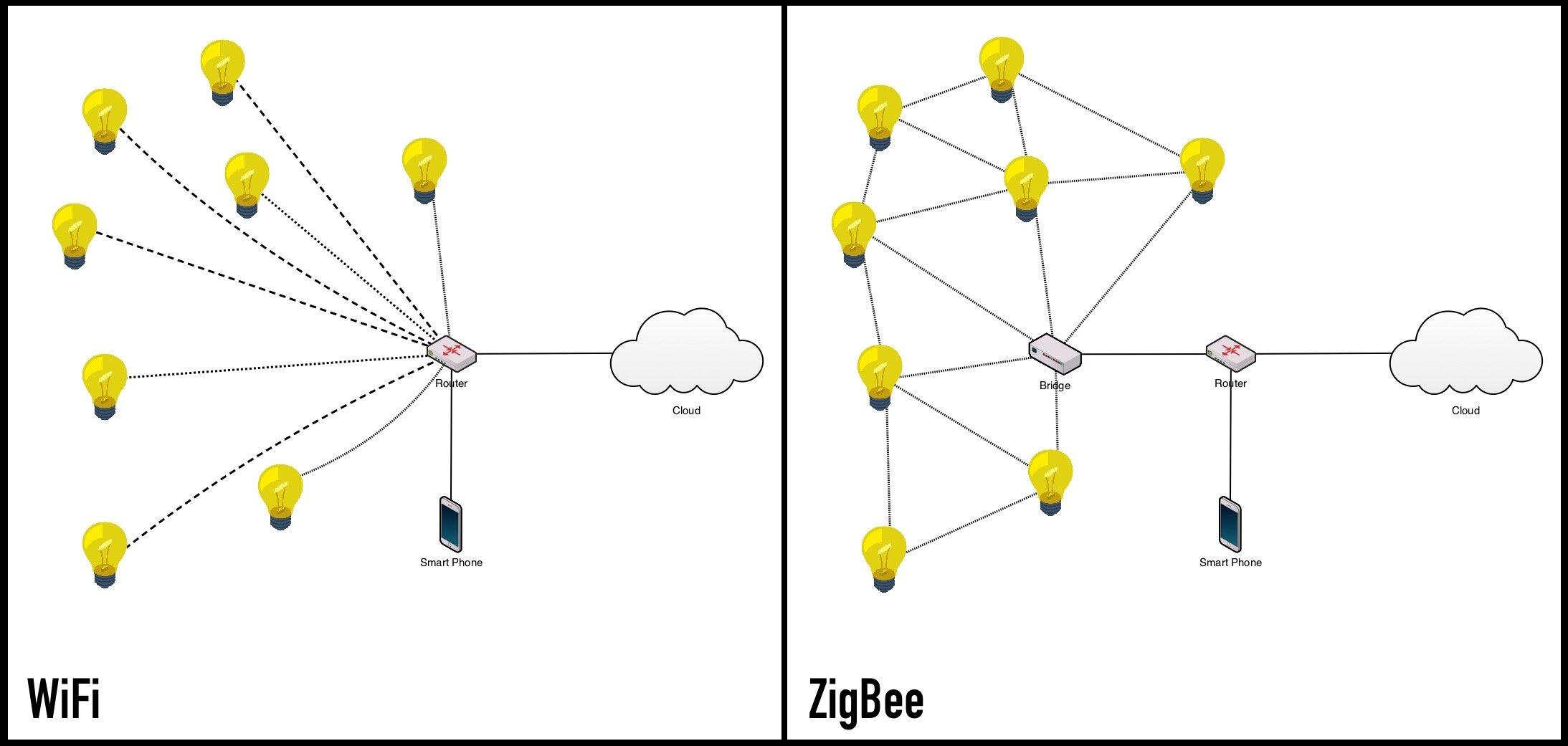 What it is: A low-power mesh protocol designed for high device counts. Zigbee devices relay signals through each other, extending coverage and reducing reliance on any single point.
Strengths
- Mesh networking. Every mains-powered Zigbee device acts as a router, forwarding signals to extend range. More devices generally means better coverage.
- Excellent battery life. Zigbee sensors and buttons can run for 1–3 years on a coin cell battery.
- High device capacity. A single Zigbee network supports 200+ devices without meaningful degradation.
- Does not burden your Wi-Fi. Zigbee runs on its own network, separate from your internet traffic.
- Mature ecosystem. Thousands of devices from brands like Aqara, IKEA, Philips Hue, and Sonoff.
Weaknesses
- Requires a hub. You need a Zigbee coordinator — a dedicated hub like the Aqara Smart Hub M3, an Amazon Echo with built-in Zigbee, or a USB coordinator with Home Assistant.
- 2.4 GHz interference. Zigbee shares the 2.4 GHz band with Wi-Fi, Bluetooth, and microwaves. In congested environments, this can cause dropped commands or slow response times. Careful channel selection helps.
- Interoperability inconsistencies. The Zigbee standard allows manufacturer extensions, which means some Zigbee devices do not play well with all Zigbee hubs. A Philips Hue bulb paired to an Aqara hub may lose some features. A universal coordinator like Home Assistant’s ZHA or Zigbee2MQTT handles this best.
- No native Matter support. Zigbee devices cannot speak Matter directly. They need a bridge (like a Hue Bridge) to be exposed as Matter devices.
Typical devices
Smart bulbs (Philips Hue, IKEA), contact sensors, motion sensors, temperature sensors, smart buttons, light switches.
Who it is best for
Zigbee excels in homes with 30+ devices, particularly battery-powered sensors and lighting systems. If you are building an automation-heavy home with lots of small, low-power devices, Zigbee’s mesh reliability and device variety are hard to beat. Pair it with a capable hub and it scales well beyond 100 devices.
Z-Wave: Reliability Where It Counts
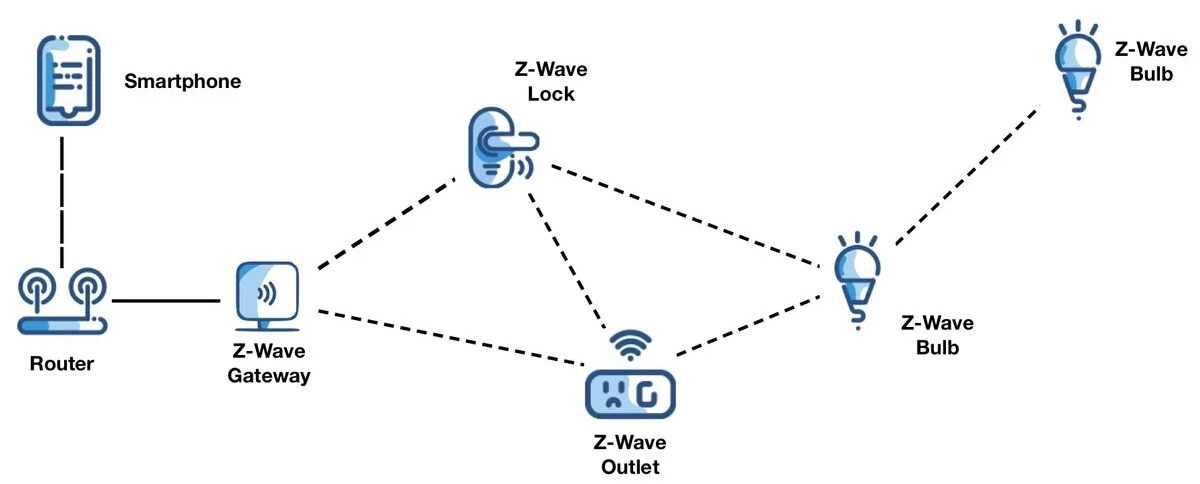 What it is: A low-power mesh protocol that operates on sub-GHz frequencies (typically 908 MHz in North America, 868 MHz in Europe). Like Zigbee, devices relay signals through each other to extend coverage.
Strengths
- Less interference. The sub-GHz frequency band is far less crowded than 2.4 GHz. Z-Wave rarely competes with Wi-Fi, Bluetooth, or other common household signals.
- Superior wall penetration. Lower frequencies travel through walls and floors better. Z-Wave devices often maintain reliable connections across multiple rooms without needing many mesh nodes.
- Strong mesh reliability. Z-Wave’s mesh implementation is tightly standardized. Devices from different manufacturers mesh together more consistently than Zigbee.
- Excellent battery life. Comparable to Zigbee — sensors and locks last 1–3 years on batteries.
- Strict certification. Every Z-Wave device must pass interoperability testing by the Z-Wave Alliance. This means fewer “works with some hubs but not others” surprises.
Weaknesses
- Requires a hub. Z-Wave needs a controller — commonly the Aeotec SmartThings Hub, Hubitat, or a USB stick with Home Assistant.
- Smaller device selection. Z-Wave has fewer consumer devices than Wi-Fi or Zigbee, and prices tend to run higher.
- 232-device limit. The protocol supports a maximum of 232 devices per network. Adequate for most homes, but lower than Zigbee’s ceiling.
- Regional frequency variations. Z-Wave uses different frequencies by country, so devices bought abroad may not work in your region.
- No native Matter support. Like Zigbee, Z-Wave devices require a bridge to expose to Matter ecosystems.
Typical devices
Door locks, garage door controllers, water leak sensors, thermostats, in-wall switches and dimmers, security sensors.
Who it is best for
Z-Wave is a strong fit for security-critical devices (locks, leak sensors, alarm sensors) where reliable signal penetration and minimal interference matter more than device count. It is the protocol of choice for many Home Assistant and SmartThings power users who prioritize automation reliability over having the cheapest devices.
Thread: The Modern Foundation
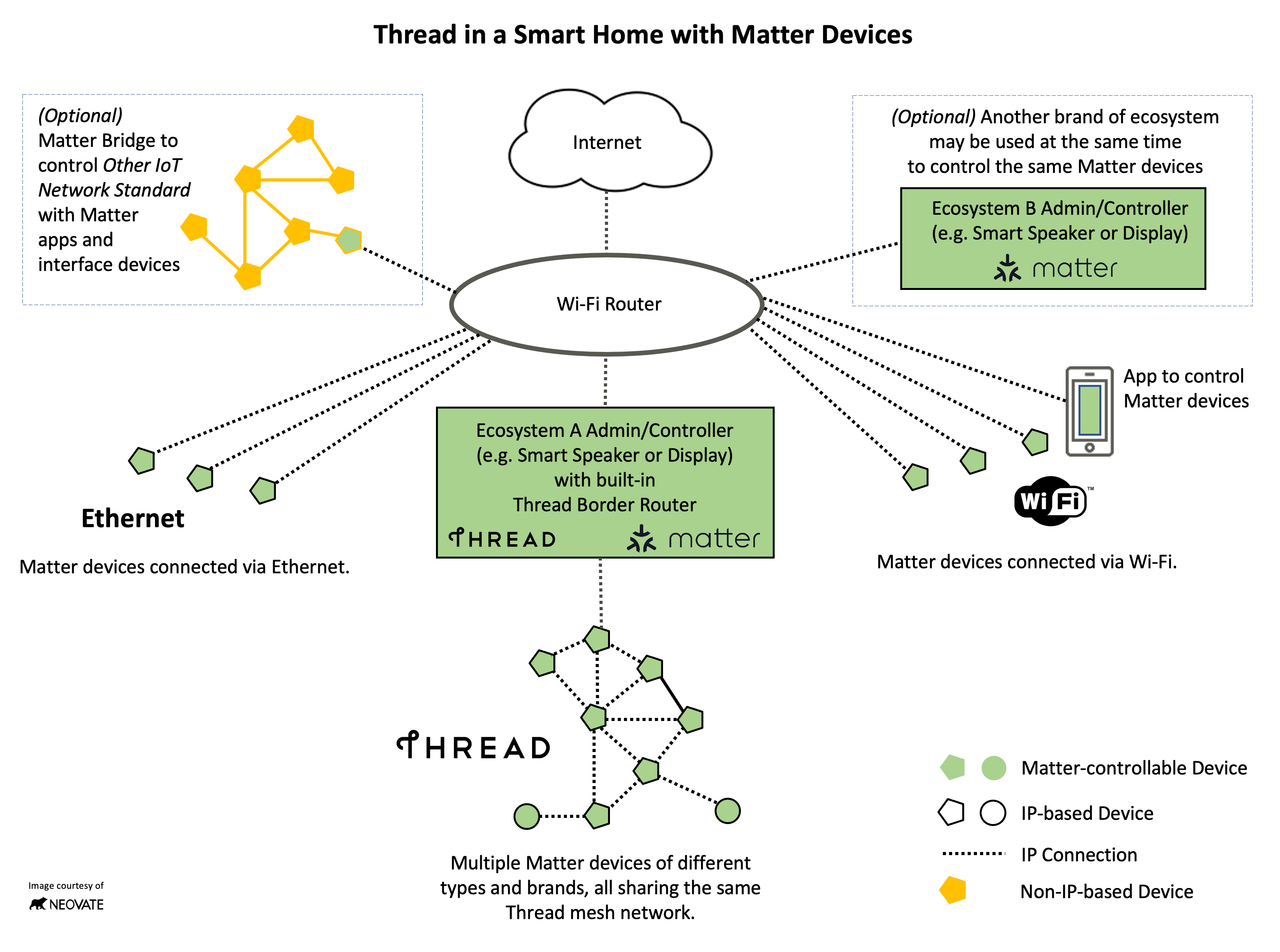 What it is: A mesh networking protocol built on IPv6, designed specifically for smart homes. Thread devices form a self-healing mesh with no single point of failure. Instead of a traditional hub, Thread uses border routers — devices that bridge the Thread mesh to your IP network.
Strengths
- Native Matter transport. Thread is one of two protocols (alongside Wi-Fi) that Matter runs on natively. If you are building a Matter-first home, Thread is the preferred transport for low-power devices.
- Self-healing mesh. If one device drops, the mesh automatically reroutes. There is no single hub that takes down the network if it fails.
- IP-based. Thread devices get real IP addresses, which simplifies communication with other networked systems. No protocol translation needed.
- Low power. Battery life is comparable to Zigbee — expect 1–2+ years on coin cells for sensors.
- No proprietary hub. Border routers are built into devices you may already own — Apple TV 4K, HomePod mini, some Google Nest speakers, some Amazon Echo devices.
Weaknesses
- Smaller device catalog. As of 2026, Thread’s device selection is growing but still trails Zigbee and Wi-Fi significantly. This is the biggest practical limitation.
- Border router dependency. While you do not need a branded hub, you do need at least one Thread border router in your home. If you do not own a compatible Apple, Google, or Amazon device, you need to acquire one.
- Ecosystem maturity. Thread networks can occasionally require troubleshooting — border router handoffs, device firmware updates, and Thread credential management are still rougher than mature Zigbee setups.
- 2.4 GHz band. Like Zigbee, Thread operates at 2.4 GHz and faces the same interference considerations.
Typical devices
Smart bulbs (like the Nanoleaf Essentials Bulb), smart plugs, sensors, and Eve’s lineup of Thread-enabled accessories.
Who it is best for
Thread is the right choice if you are starting fresh, investing in Matter-compatible devices, and want a setup that will age well. It is less ideal if you need a specific device type that Thread does not yet cover — in that case, supplement with Zigbee or Wi-Fi for now.
How They Stack Up: Real-World Scenarios
The table above covers specs. Here is what the differences mean in daily use.
Network load
A home with 10 smart plugs and 5 smart bulbs on Wi-Fi is eating 15 device slots on your router. The same setup on Zigbee uses one slot (the hub). At 50+ devices, this difference becomes serious. If you are building a larger system, a dedicated mesh protocol keeps your Wi-Fi network healthy for the things that actually need bandwidth — streaming, video calls, and laptops.
Battery devices
If you want battery-powered contact sensors on every door, motion sensors in hallways, and temperature sensors in each room, Wi-Fi is not an option. Zigbee, Z-Wave, and Thread all handle battery devices well. Zigbee currently offers the widest selection of battery sensors at the lowest prices.
Signal reliability
In a large or multi-story home with thick walls, Z-Wave’s sub-GHz frequencies give it an edge. A Z-Wave lock on a second floor will often maintain a more reliable connection to a basement hub than a Zigbee sensor would. Thread and Zigbee compensate with denser mesh networks — more devices means more routes — but Z-Wave needs fewer nodes to cover the same area.
Future-proofing
Thread plus Matter is the industry’s consensus direction. Apple, Google, Amazon, and Samsung are all investing in it. That said, “future-proof” is relative. Zigbee hubs and Z-Wave controllers will continue working for years. If your current setup works well, there is no reason to rip it out. Future-proofing matters most when you are buying new devices today.
Decision Matrix: Which Protocol Should You Choose?
Rather than picking one protocol, most homes end up using two or three. Here is how to decide what goes where.
Choose Wi-Fi when:
- The device needs high bandwidth (cameras, video doorbells, smart displays)
- You have fewer than 20–25 total smart devices
- The device is wall-powered and you want zero-hub simplicity
- You want Matter compatibility without adding a border router
Choose Zigbee when:
- You are deploying many battery sensors (contact, motion, temperature)
- You want a proven, large device ecosystem at reasonable prices
- You are running Home Assistant, SmartThings, or another hub-based platform
- You need 30+ devices on a mesh that does not touch Wi-Fi
Choose Z-Wave when:
- Signal reliability through walls is critical (locks, security sensors, basement devices)
- You want strict device interoperability certification
- You are building an automation-heavy setup on SmartThings, Hubitat, or Home Assistant
- You need devices in a congested 2.4 GHz environment and want to avoid that band entirely
Choose Thread when:
- You are building a new setup and want the most future-proof foundation
- You are committed to Matter and want native (not bridged) support
- You already own a Thread border router (Apple TV, HomePod mini, compatible Nest or Echo)
- Low power and mesh reliability matter, and the device you need is available in Thread
A practical starting point
For most new smart home buyers in 2026: use Wi-Fi for cameras and speakers, Thread (with Matter) for new plugs and bulbs, and Zigbee to fill gaps where Thread device selection falls short. If you already have a Z-Wave setup that works, keep it — there is no urgency to migrate.
Can You Mix Protocols?
Yes, and you should expect to. Very few homes run a single protocol. The key is having a platform that bridges them. Home Assistant supports all four protocols natively. SmartThings handles Zigbee, Z-Wave, Wi-Fi, and Matter. Apple Home manages Wi-Fi, Thread, and Matter devices (Zigbee and Z-Wave require a bridge like a Hue Bridge or SmartThings hub).
If you are choosing a hub, our upcoming hub comparison guide will cover which platforms handle which protocols — and how well. The main thing to know now is that protocol mixing is normal and expected. Pick protocols based on what each device category needs, not based on a desire for uniformity.
The Bottom Line
There is no single “best” protocol. Each one makes a specific set of trade-offs, and the right choice depends on what you are connecting, how many devices you are running, and how much you care about future-proofing versus immediate device selection.
Wi-Fi is the easy default. Zigbee is the reliable workhorse. Z-Wave is the quiet specialist. Thread is the forward-looking foundation. Most smart homes will use at least two of these, and that is perfectly fine.
Start with what solves your problem today. Expand with what fits your system tomorrow.
Frequently Asked Questions
Is Matter a protocol like Zigbee or Z-Wave?
Can I mix protocols in the same smart home?
Which protocol has the best range?
Should I avoid Zigbee and Z-Wave now that Thread exists?
Recommended Posts
Matter Explained: What It Is, Why It Matters, and Which Devices Support It
What Matter actually changes for smart home buyers — device compatibility, current support, setup experience, and honest limitations.
Smart Home Protocols: Wi-Fi, Zigbee, Z-Wave, Thread, and Matter Explained
A beginner-friendly breakdown of how smart home devices communicate — what each protocol does, when you need a hub, and why Matter changes everything.
Smart Home Devices Explained: What Each Category Does
A quick overview of every major smart home device category — what it does, who it's for, and what to watch out for before buying.